
Press the eye icon (above the red button) on the keypad twice.
Select Supervisor (using the arrows keys below the screen and press the green button once highlighted).
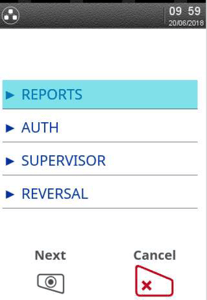
The terminal will prompt for your supervisor password. Once entered press the green button.
Select Password.
-1.jpeg?width=202&height=300&name=rtaImage%20(4)-1.jpeg)
Select MAC Reset. Do not under any circumstances select any other option on this menu.
Select All.
Press the green button on the keypad to confirm.
Try a test transaction for 1p to check if the error has cleared.
If the error "Log-On Required" appears click here.
If the same error appears please call our support team for these terminals on 01933 201225.