
Press the eye icon (above the red button) on the keypad twice.
Select Reports (using the arrows keys below the screen and press the green button once highlighted).
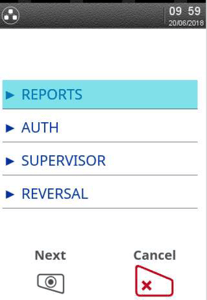
The terminal will prompt for your supervisor password. Once entered press the green button.
Select End of Day.
-Dec-02-2025-05-00-18-4955-PM.jpeg?width=203&height=300&name=rtaImage%20(1)-Dec-02-2025-05-00-18-4955-PM.jpeg)
Select All.
-3.jpeg?width=203&height=300&name=rtaImage%20(2)-3.jpeg)