
A Pre-Auth is when you reserve the funds from your customer. This will then need to be followed by a Completion when you are ready to actually take them.
Press the eye icon (above the red button) on the keypad three times.
Select Hotel (using the arrows keys below the screen and press the green button once highlighted).
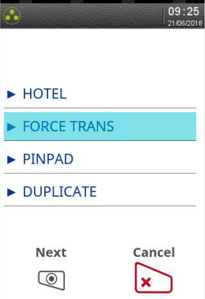
Select Pre-Auth.
If the Pre-Auth option does not appear please call 01933 201225.
-Dec-02-2025-07-23-26-4037-PM.jpeg?width=201&height=300&name=rtaImage%20(1)-Dec-02-2025-07-23-26-4037-PM.jpeg)
Insert the card.
-Dec-02-2025-07-23-26-3328-PM.jpeg?width=202&height=300&name=rtaImage%20(2)-Dec-02-2025-07-23-26-3328-PM.jpeg)
Enter the amount for the transaction using the keypad and press the green button.
-3.jpeg?width=204&height=300&name=rtaImage%20(3)-3.jpeg)
A Completion will then need to be carried out when you taking the funds from the customer.
Press the eye icon (above the red button) on the keypad three times.
Select Hotel.
Select Pre-Auth.
Insert the card.
Enter the amount for the transaction using the keypad and press the green button.
If you should experience any issues please call our support team for these terminals on 01933 201225.