
On the sale screen, press the blue box at the top of the screen..jpg?width=226&height=300&name=rtaImage%20(59).jpg)
Select Supervisor (you may need to press the down arrow on screen for it to appear)..jpg?width=203&height=300&name=rtaImage%20(60).jpg)
Enter the Supervisor password and press the green button..jpg?width=200&height=300&name=rtaImage%20(61).jpg)
Select Log-on.
Select All Acquirers.
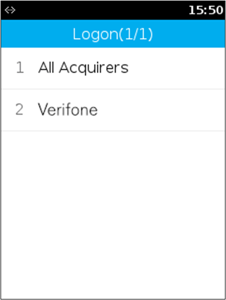
If the terminal says "are you sure?" press the green button.
-1.jpeg?width=226&height=300&name=rtaImage%20(1)-1.jpeg)
This will print a receipt to show if AIB or Auth Host (depending on your acquiring bank) is enabled.
As long as it is enabled please try a 1p transaction to test.
If the same error persists please click on "Chat" on the bottom-right hand corner of the screen or e-mail techsupport@card-saver.co.uk for assistance