
About E-Mail Receipts
E-Mail Receipts are receipts for transactions for a business and its customers sent to an e-mail address. Once enabled, the business and the customer will receive the details of every transaction that has been successfully completed.
The Gateway can be configured to email transaction receipts automatically to the Customer and notifications to the Merchant.
Customer Email Receipts
The Customer can be emailed a transaction receipt automatically each time a transaction is processed by the Gateway. Receipts are sent at the time the transaction is authorised and only for transactions where the Acquirer has approved the authorisation.
Receipts are not sent for declined or referred authorisations or aborted transactions. This functionality is enabled globally on a per Merchant Account basis using the Merchant Management System (MMS).
-Dec-03-2025-10-04-54-3519-AM.jpeg?width=655&height=487&name=rtaImage%20(2)-Dec-03-2025-10-04-54-3519-AM.jpeg)
Merchant Email Notifications
You can be automatically emailed a transaction notification each time a transaction is processed by the Gateway. Notifications are sent at the time the transaction is authorised and only for transactions where the Acquirer approved, declined, or referred the authorisation. Notifications are not sent for aborted transactions. This functionality is enabled globally on a per Merchant Account basis, using the Merchant Management System (MMS).
Fields Required
Merchant Management System
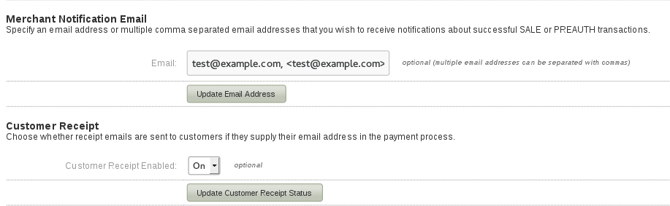
The Merchant Preferences page is used to configure your email receipt preferences. The Preferences page contains the following sections:
| Merchant Notification Email | This field allows you to enter an email address (multiple email addresses can be separated with commas) and the emails entered will receive a notification when a SALE transaction is made. The Merchant Notification Email is branded to match the Gateway. |
| Customer Receipt | If switched to 'Yes' and the Cardholder supplies a valid email address, this allows a copy of the Gateway receipt to be sent to the Cardholder. The Customer Receipt is branded to match the Gateway. |
How E-Mail Receipts Work
Merchant Notification Emails
If a valid RFC 2822 email address string is present in the Merchant Notification Email in the MMS (Merchant Management System) or a value is sent in via the notifyEmail field (which will take priority over the e-mail set in the Merchant Notification Email field in the MMS) AND the transaction is a successful sale with a predetermined date of capture (i.e. capture delay is not set to -1 or never), a notification email will be sent to the address/addresses specified by the merchant.
The examples below can be combined but need to be comma separated:
1. test@example.com
2. <test@example.com>
3. Test Account <test@example.com>
Customer Emails
If the Customer Receipt field is set to ‘On’ in the MMS (Merchant Management System), or a ‘Y' is sent via the customerReceiptsRequired field (which will take priority over the Customer Receipt field in the MMS) and the transaction is a successful sale with a predetermined date of capture (i.e. capture delay is not set to -1 or never), AND the customer has supplied a valid email address in the customerEmail field, then a receipt email will be sent to the address in the customerEmail field.