
We first need to make sure that the card terminal is connected.
On the sale screen, press the grey box at the bottom of the screen.
-3.jpeg?width=200&height=300&name=rtaImage%20(1)-3.jpeg)
Select Management.
Select Settings.
Select Communication.
Enter your terminal password followed by the green button.
.jpg?width=200&height=300&name=rtaImage%20(61).jpg)
This will display the communication panel. Either Wi-Fi or Mobile Data (or both) should display up. Otherwise please follow the relevant connection troubleshooting below before proceeding.
Wi-Fi Troubleshooting
GPRS Troubleshooting
Otherwise keep pressing the red cross button on the keypad until you are back at the sale screen.
On the sale screen, press the grey box at the bottom of the screen.
Select Administration.
Select Batch.
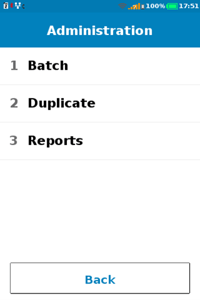
Select Settlement.
The terminal will prompt for your supervisor password. Once entered press the green button.
Keep pressing the red cross button on the keypad until you are back at the sale screen.
Try a 1p test transaction to check if the same error occurs.
If it does, repeat the batch/settlement steps again and try another 1p transaction.
If the same error persists please e-mail tech.support@card-saver.co.uk. An agent will then contact you as soon as possible.