
Creating the RT Agreements
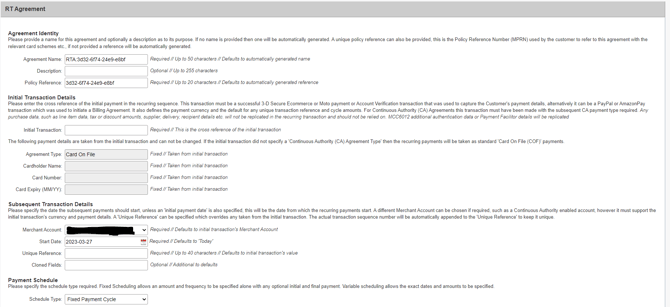
A Recurring Transaction Agreement is setup with the gateway to start on a fixed date in the future. To create a new RT Agreement, click on the ‘Create/Modify RT Agreement’ button in the top right hand corner. Once loaded the page should look like the below.
RT Agreement Lookup
| RT Agreement | This allows you to search for a specific Agreement by ID or Agreement Name. |
RT Agreement Creator
| Rule Name | Required | This gives you the option to give the new RT Agreement a specific name. The default is an automatically generated and can be changed. |
| Description | Optional | The description field can be used for further information (e.g. logging who created the Agreement, etc). |
| Policy Reference | Required | This gives you the option to give a unique policy reference can also be provided, this is the Policy Reference Number (MPRN) used by the customer to refer to this agreement with the relevant card schemes etc., if not provided a reference will be automatically generated. |
| Base Transaction | Required | This is the cross reference of the transaction that acts as the basis for each recurring transaction. This transaction is used to provide the payment information (card number, expiry date, etc.), payment currency and as the default for any unique transaction reference and cycle amounts. |
| Merchant Account | Required | This specifies the Merchant Account you wish to set the RT Agreement up on. The Merchant account must support the base transaction’s currency and card type. |
| Start Date | Required | This specifies the date the RT Agreement should start, unless an 'initial payment date' is also specified, this will be the date from which the payment cycles start. Defaults to 'Today'. |
| Method | Required | This will specify whether payments should be sent as a 'Card On File (COF)' payment or sent to the Acquirer marked as a 'Continuous Authority (CA)' payment. Defaults to 'Card On File'. |
| Unique Reference | Required | A 'Unique Reference' and 'Order Description' can be specified for each payment which overrides any used in the base transaction. The actual transaction sequence number will be automatically appended to the 'Unique Reference' to keep it unique. Defaults to base transaction's value. |
| Recurring Amount | Required | This allows you to specify the amount of each recurring payment under the Agreement. Defaults to base transaction amount. |
| Take Payment Every | Required | This specifies the frequency of each recurring payment under the Agreement. |
| Repeat | Required | This allows you to specify a fixed number of payment cycles for the Agreement, or the Agreement can run indefinitely until manually cancelled. |
| Initial Payment Date | Optional | Specify the date when the Agreement should start. Defaults to agreement start date. |
| Initial Amount | Optional | Specify whether a different amount should be taken on the initial payment. Defaults to recurring amount. |
| Final Payment Date | Optional | Specify the final payment date. Defaults to date of last recurring payment. |
| Final Amount | Optional | Specify the final amount that should be taken. Defaults to recurring amount. |
Once ‘Create Agreement’ has been clicked, the Agreement will be activated and put in place.
Stopping a RT Agreement
If an Agreement is no longer required and can be cancelled/stopped simply go to the RT Agreements panel and locate the Agreement you wish to stop.
To stop the RT Agreement click on the Action drop down box and click on Stop, follow the dialog box instructions and then the RT Agreement should stopped. You will be able to tell by looking in the state column of the RT Agreement portal.