
Using RT Agreements
The Recurring Transactions creation/information page can be accessed via the RT Agreements on the main menu in the MMS.
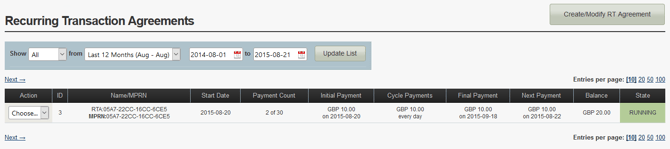
Main Screen
| Action | View – View details of the Agreement selected View Txs – View all transactions from this Agreement Stop – Stop the Agreement from running |
| ID | The Rule ID for the Agreement |
| Name/MPRN | Agreement name and Agreement Policy Reference Number |
| Start Date | Date the Agreement began |
| Payment Count | How many times the Agreement has ran |
| Initial Payment | Amount and date of initial transaction |
| Cycle Payments | Amount of agreed payments and occurrence |
| Final Payments | Final amount agreed and date |
| Next Payment | Upcoming payment amount and date |
| Balance | Amount processed so far |
| State | Status of Agreement Running - Active Pending - Waiting to process Stopped - Inactive |